Links
We recommend the following websites to help you with your coding:
Coding Edits: http://www.cms.gov/Medicare/Coding/NationalCorrectCodInitEd/index.html. This site will tell you which codes you can't bill together. For instance, you can't bill an OCT optic nerve and an OCT macula on the same visit. The website is updated quarterly. Our advise is to download the codes into Excel, and then search for your procedure codes that are on your router with the "ctrl F" function. You can quickly look through your procedure codes to find out if new exclusionary edits have been created.
PQRS: http://www.cms.gov/Medicare/Quality-Initiatives-Patient-Assessment-Instruments/PQRS/index.html
DME Fee Schedule: http://www.cms.gov/Medicare/Medicare-Fee-for-Service-Payment/DMEPOSFeeSched/DMEPOS-Fee-Schedule.html
DME Center: http://www.cms.gov/Center/Provider-Type/Durable-Medical-Equipment-DME-Center.html
Coverage Determinations: http://www.cms.gov/medicare-coverage-database/indexes/ncd-alphabetical-index.aspx?bc=BAAAAAAAAAAA
Ophthalmology Resources: http://www.cms.gov/Outreach-and-Education/Medicare-Learning-Network-MLN/MLNProducts/ophthalmology.html
MVI Fee Schedule: http://www.cms.gov/apps/physician-fee-schedule/overview.aspx
ASC Fee Schedule: http://www.cms.gov/Medicare/Medicare-Fee-for-Service-Payment/ASCPayment/11_Addenda_Updates.html
Coding Edits: http://www.cms.gov/Medicare/Coding/NationalCorrectCodInitEd/index.html
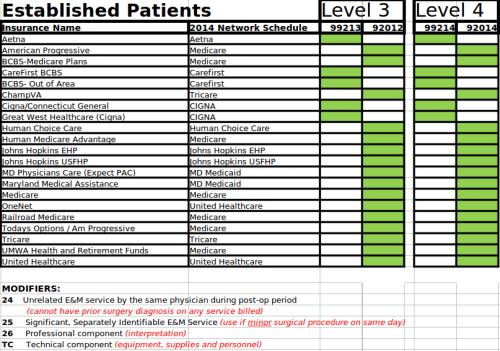
Coding Sheet
Every practice needs to figure out which codes pay more with each
carrier. If you have the proper level of documentation for either code,
you need to select the code that is going to pay you more. First, you
need to consult with every carrier and see their reimbursement schedule
for each exam listed below. Then you should fill in the spreadsheet,
print it out, and place it in every exam lane in your office. We
generally just mark the higher paid exams with a green square so that
the patient doesn't see all of the numbers. Please click on the preview picture
below to download and make your own copy.